English
 Русский язык
 بالعربية

Products Description
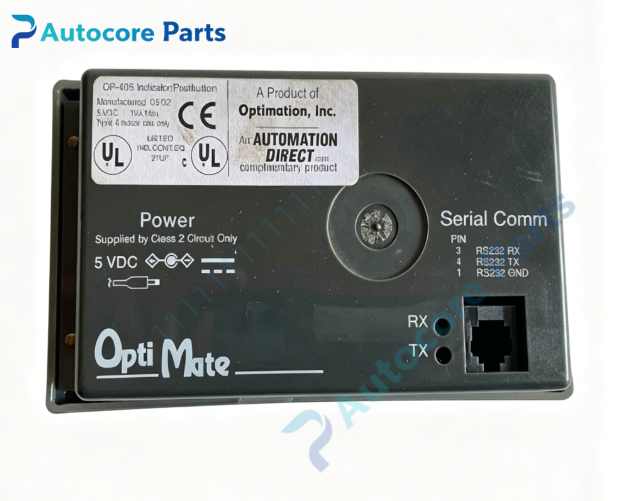
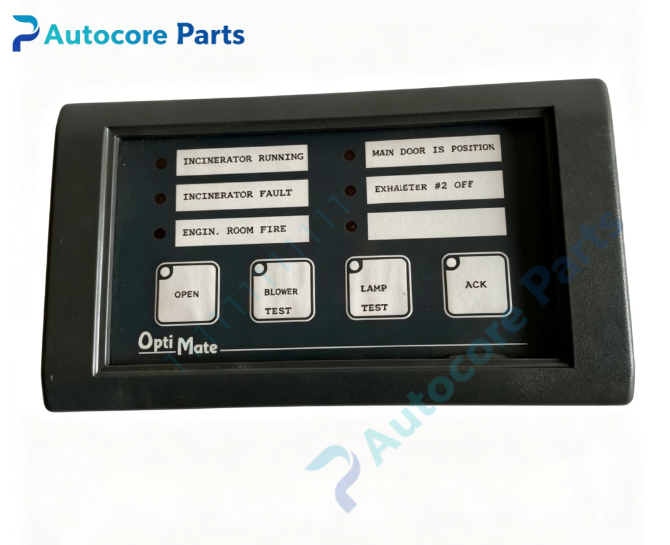
OPTIMATION OP-406 Indicator Pushbutton Panel

Module Feature
OPTIMATION OP-406 belongs to OptiMate series compact indicator and pushbutton operator panel. Equipped with 6 independent LED status indicators and 4 membrane pushbuttons. Each LED can be configured for steady ON/OFF or flashing alarm state. Pushbuttons support momentary or latch operation mode. Customizable legend label inserts can be installed behind front panel overlay for marking function descriptions. It adopts RS422 multi-drop serial bus communication, compatible with OP-9001 / OM-9001-2 communication master gateway. Front panel meets NEMA4 / IP65 protection grade. Widely used for local manual operation and equipment status display in semiconductor wet bench and chemical delivery control cabinet.
Working principle: OP-406 communicates over RS422 multi-drop bus with communication master and host PLC. PLC controls the on/off and flash state of 6 LED indicators to display running, fault and interlock status. Operator pressing pushbuttons sends digital command signals back to PLC for equipment start, stop and mode switching. Multiple OptiMate panels can share one PLC serial port via multi-drop network. Onboard components:Sealed membrane pushbuttons,6 LED indicator lamps,main control PCB,RS422 transceiver circuit,metal front frame, rear power terminal block
LED indicators6 independent configurable LED indicators on front panel for status and alarm display
Hardware self-diagnosis
Visual inspection, pushbutton function test, LED lighting test, RS422 bus communication test, station address conflict verification
Programming software
OP-WINEDIT OptiMate configuration software for button function definition, LED flash logic, baud rate and station address assignment
Electrical & Process Parameters
Power supply:8 ~ 30VDC I/O allocation:6 LED indicators,4 membrane pushbuttons Communication:RS422 multi-drop serial bus Mount type:Cabinet panel cutout mounting
Mechanical & Structure
Mounting:Panel cutout installation with locking clamps Protection class:IP65 / NEMA4 front face, IP20 rear side
Environmental
Operating temperature:0℃ ~ +50℃ Ambient humidity:5~95% non-condensing Certification:CE compliant Status:OPTIMATION OptiMate compact pushbutton indicator operator panel
System compatibility
Compatible with OP-9001, OM-9001-2 communication master gateway; works with OL4054, OL4058, OL4228 OptiLogic RTU racks and mainstream PLC.
Function
OP-406 pushbutton indicator panel manufactured by OPTIMATION. It provides simple local operation and status indication. Wrong baud rate, duplicate station address or missing bus termination resistor will cause communication failure. It is compact local operation interface component for wet bench chemical delivery automation control system.
Installation
Follow lockout/tagout safety procedure before installation. Power off control cabinet. Install panel into cabinet cutout and secure locking clamps. Wire 8~30VDC power and shielded RS422 multi-drop bus cable. Set station address, download configuration project in OP-WINEDIT, verify button trigger and LED indication before system startup.
InterfaceDC power terminal block, RS422 bus terminal block, front membrane pushbuttons and LED indicators on housing of OP-406.
Diagnostic
No communication:Baud rate mismatch, wiring fault or station address conflict. LED not lighting:Power supply out of 8~30VDC range or LED failure. Single button no response:Membrane pushbutton aging or damage. Intermittent communication:Unshielded cable and electromagnetic interference.

Product Brief
OP-406 OPTIMATION OptiMate indicator pushbutton operator panel,8~30VDC supply,6 LED indicators and 4 membrane pushbuttons,RS422 multi-drop bus,IP65 front panel,for semiconductor wet bench and chemical delivery equipment local operation and status indication.